Navigation menu
hello Guest

Student Manual
How to view Test History of Assessments, Quizzes, Exercises, and Practice Tests
On the Dashboard, click the Test History & Performance Analytics tab. Click the Review button next to the Test History & Progress Reports option.

Figure 6.69: Test History & Progress Reports Page

Figure 6.70: Test History & Progress Reports Page with Search Box
You can also search for a particular assessment, quiz, exercise, lab, or practice test via their mode and type. Click the Test Mode drop-down to select desired mode.
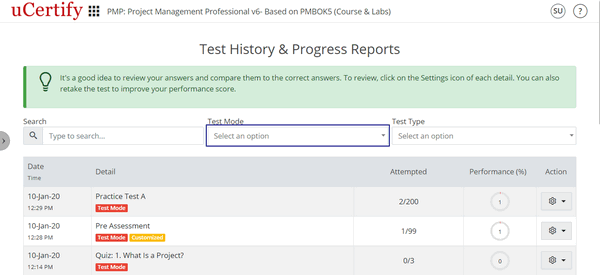
Figure 6.71: Test History & Progress Report Page with Test Mode Box
Now, click the Test Type drop-down and select the type of the test for which you wish to view the result.

Figure 6.72: Test History & Progress Report Page with Test Type Box
Figure 6.69: Test History & Progress Reports Page
You can also search for a particular assessment, quiz, exercise, lab, or practice test via their mode and type. Click the Test Mode drop-down to select desired mode.
Figure 6.71: Test History & Progress Report Page with Test Mode Box
Now, click the Test Type drop-down and select the type of the test for which you wish to view the result.
Figure 6.72: Test History & Progress Report Page with Test Type Box